Turning 2.5 billion building footprints into a local geospatial API — and mapping them over MapSavvy aerial imagery.
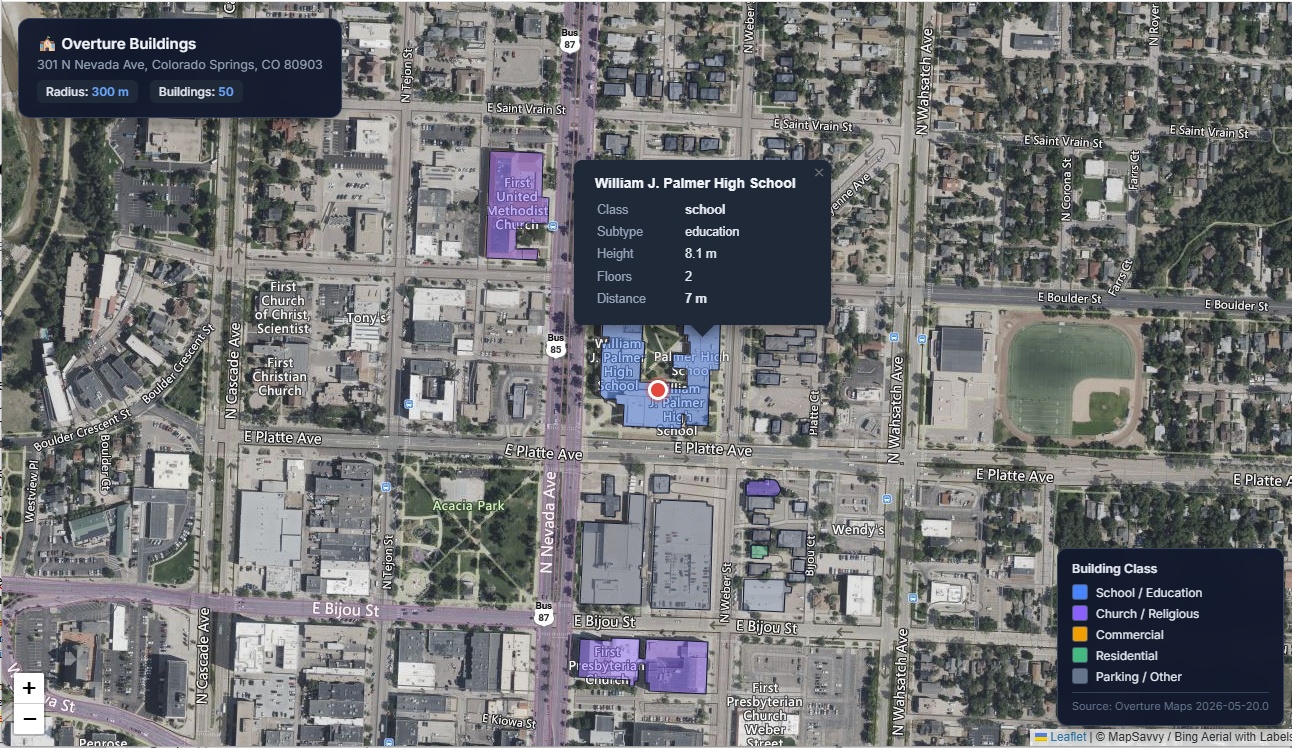
See it live: Open the sample Hermes-generated map with Overture building footprints rendered over MapSavvy aerial imagery.
Why Overture
Overture Maps is an open dataset published by the Overture Maps Foundation, a Linux Foundation project founded in December 2022 by Amazon (AWS), Meta, Microsoft, and TomTom, with Esri and a dozen-plus other companies joining later as members. Its buildings theme is the relevant one here — and it is enormous.
When I ran the dataset info tool against the release my server points at, it reported a release of 2026-05-20.0 with a sample count of 2,543,500,269 records, served from s3://overturemaps-us-west-2/release/2026-05-20.0/theme=buildings.
2.54 billion building records, served as Parquet straight off S3. No account, no API key, no per-call billing. The trick is querying it efficiently — which is exactly what the MCP server is for.
Overture doesn't have a traditional REST API — the storage endpoint is the API. Data is distributed as GeoParquet files on public cloud storage (AWS S3 and Azure), following the cloud-native geospatial pattern that makes services like Cloud Optimized GeoTIFFs and PMTiles work.
The Hermes v0.14 agent connected to the Grok 4.3 LLM easily handled generating an API and a FastMCP overture-mcp-server to access GeoParquet Overture data.
Step 1 — The Overture MCP Server
The server is built on FastMCP and queries Overture's S3 Parquet release directly with DuckDB. DuckDB's httpfs + Parquet support means I can run spatial filters against the cloud dataset without ever downloading the full files — it only pulls the byte ranges it needs.
Overture's S3 layout is strict. Data is partitioned by theme and type, so queries have to target the precise path:
s3://overturemaps-us-west-2/release/2026-05-20.0/theme=buildings/type=building/*.parquet
Lazy glob patterns like /release/.../*/* fail silently — you get no error and no rows, which is the worst kind of failure. Point at the exact theme=.../type=.../ path and it works.
Registration in ~/.hermes/config.yaml:
mcp_servers:
  overture_maps:
    command: python
    args:
      - /home/hermes/workspace/overture-mcp-server/server.py
    env:
      OVERTURE_RELEASE: "2026-05-20.0"
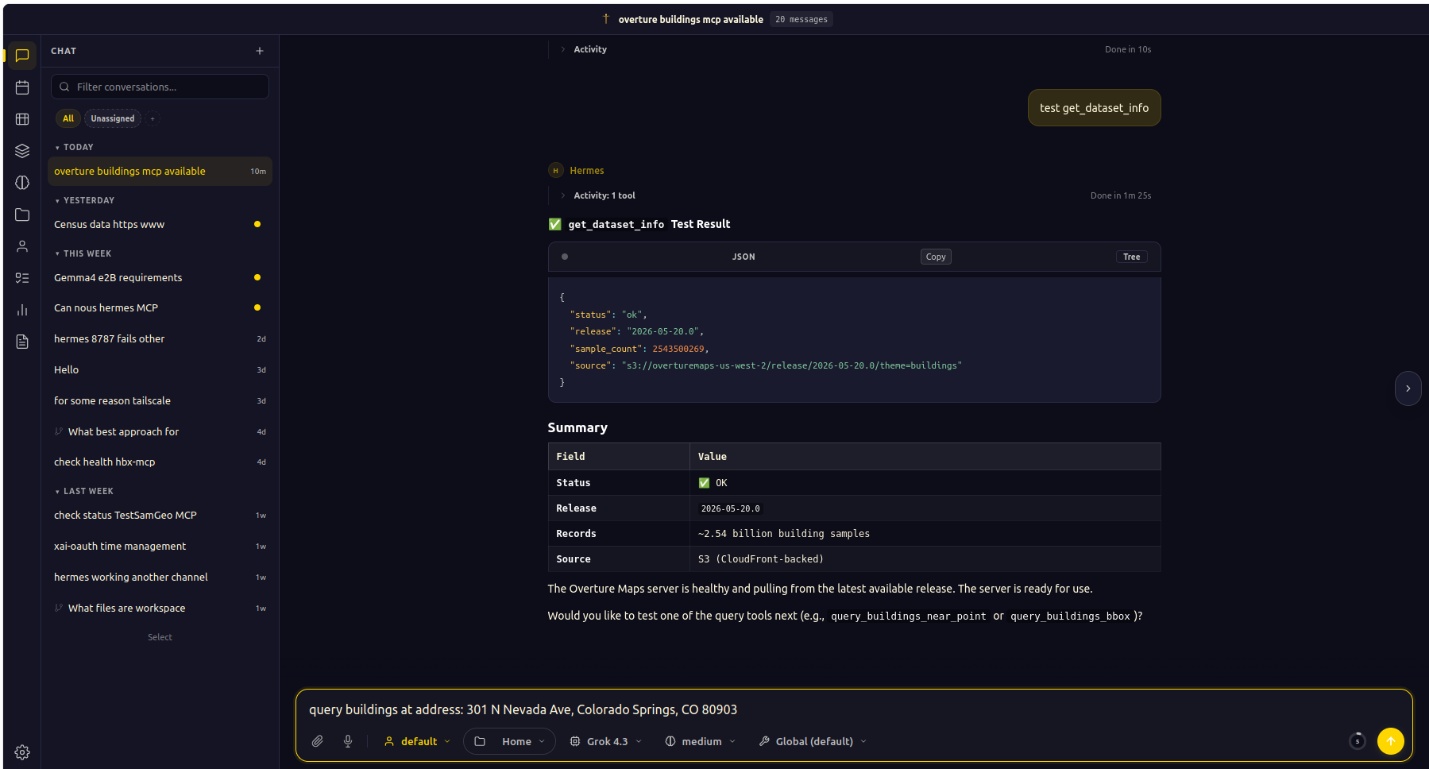
get_dataset_info health check — confirming the server is live and pulling from the latest Overture release before any queries run.The full tool surface
The draft version of this server only exposed building queries. The current one covers four Overture themes plus a dataset health check — 10 tools discovered on first connection:
- Buildings (3) —
query_buildings_near_point(buildings within a radius of a lat/lon),query_buildings_bbox(buildings inside a bounding box), andget_building_stats(counts and aggregates for an area) - Land (2) —
query_land_near_pointandquery_land_bbox - Divisions (2) —
query_divisions_near_pointandquery_divisions_bbox - Addresses (2) —
query_addresses_near_pointandquery_addresses_bbox - Dataset (1) —
get_dataset_info(release version, record count, source path, and a health check)
Every theme follows the same two-shape pattern — query by point-and-radius or by bounding box — so once you've learned one, you've learned them all. That consistency matters a lot to the agent: it can generalize from "buildings near a point" to "land near a point" without me documenting each tool separately.
Step 2 — Let the Agent Drive
This is where running it inside an agent pays off. Hermes is model-agnostic; in this session it was orchestrating with Grok 4.3, but the workflow is identical regardless of the underlying model. I gave it one plain-English instruction:
query buildings at address: 301 N Nevada Ave, Colorado Springs, CO 80903
The agent did three things on its own: it called the RouteManagement MCP (also registered in Hermes) to turn the address into coordinates — 38.83859, -104.82048; it called query_buildings_near_point against the Overture server with those coordinates; and it summarized the result back to me. No intermediate steps from me. The address went in; structured building data came out.
What came back
query_buildings_near_point(
    lat=38.83859,
    lon=-104.82048,
    radius_meters=300,
    min_height=2.0,
    limit=50
)
The ten nearest results:
| # | Name | Class / Subtype | Height | Floors | Distance |
|---|---|---|---|---|---|
| 1 | William J. Palmer High School | school / education | 8.1 m | 2 | 7 m |
| 2 | Borriello Brothers | commercial | 3.0 m | 1 | 24 m |
| 3 | YMCA and First Presbyterian Church Parking Garage | parking / transportation | 9.2 m | — | 52 m |
| 4 | — | — | 6.0 m | 2 | 56 m |
| 5 | — | — | 6.4 m | — | 61 m |
| 6 | — | — | 3.2 m | — | 64 m |
| 7 | YMCA | — | 7.1 m | — | 64 m |
| 8 | First Presbyterian Church | church / religious | 9.5 m | — | 66 m |
| 9 | — | — | 6.6 m | — | 70 m |
| 10 | Armentrout Residence | — | 5.2 m | — | 72 m |
The agent's own read of the area was accurate: the queried address sits directly adjacent to William J. Palmer High School (7 meters away), surrounded by a mix of educational, religious, commercial, and parking structures — and every record came back with a real footprint polygon attached.
A realistic note here: several of the nearest footprints are unnamed. That's normal for Overture — geometry coverage is far more complete than attribute coverage. You always get the polygon, height, and class; names and floor counts are best-effort. Plan your UI around that.
Step 3 — From Data to Map, in One More Prompt
A table is fine, but I wanted to see it. So the second instruction was just:
make radius larger and add the footprints to a leaflet map using MapSavvy WMTS as the base along with popup showing class, height, number of floors, and distance
The agent widened the query, then generated a single self-contained HTML map. Two design choices made this clean.
MapSavvy for the basemap. Since OSM tiles were blocking direct embeds, I pulled the basemap from MapSavvy's WMTS service — the Bing "Aerial with Labels" layer, giving me satellite imagery plus road and place labels. No 403s, and the aerial view makes the footprints far more legible than a flat street map. The nice part: MapSavvy publishes its tiles in the Web Mercator (GoogleMapsCompatible) matrix set, so the RESTful {TileMatrix}/{TileCol}/{TileRow} path lines up one-to-one with Leaflet's standard {z}/{x}/{y} tile template. No WMTS plugin required — a plain L.tileLayer does it:
// MapSavvy WMTS — Bing "Aerial with Labels", served as RESTful tiles.
// The matrix set is Web Mercator, so {TileMatrix}/{TileCol}/{TileRow}
// is exactly Leaflet's {z}/{x}/{y}.
L.tileLayer(
  'http://wmts2.mapsavvy.com/WMTS.svc/<MAPSAVVY_KEY>/AerialWithLabels/{z}/{x}/{y}.jpg',
  {
    attribution: '© MapSavvy / Bing Aerial with Labels',
    maxZoom: 19,
    maxNativeZoom: 19,
    tileSize: 256
  }
).addTo(map);
Footprints as embedded GeoJSON. Each Overture polygon went straight into the page as a GeoJSON feature, color-coded by class — blue for schools, purple for religious buildings, orange for commercial, green for residential, gray for parking and unclassified. Hovering or clicking a footprint opens a popup with exactly the fields I asked for: class, height, floor count, and distance from the query point. The whole thing is one .html file with the data baked in, so it works anywhere with no backend.
Why This Architecture Holds Up
| Component | Role |
|---|---|
| Hermes agent | Orchestrates geocode → query → map generation in a single session |
| Overture MCP | Treats 2.54B building records as a local API — no keys, no billing |
| RouteManagement MCP | Turns plain-text addresses into coordinates |
| MapSavvy WMTS | Reliable aerial imagery when OSM tiles block embeds |
| DuckDB | Spatial filtering against cloud Parquet, no full downloads |
| Leaflet | Renders everything client-side, zero backend |
The pattern that makes this work is the MCP layer. The moment a dataset becomes a registered tool, the agent stops treating it as a research problem and starts treating it as a capability — it just uses it. The intelligence shifts from "how do I query 2.5 billion Parquet rows" to "the user wants buildings near an address," and the plumbing disappears.
What I Learned
- Overture's S3 paths are unforgiving. Target
theme=buildings/type=building/*.parquetexactly. Wildcards across partitions fail silently. - Geometry beats attributes in Overture. Expect every footprint to have a polygon, height, and class; treat names and floor counts as optional.
- One consistent tool shape scales. Point-radius and bounding-box queries across all four themes let the agent generalize without per-tool hand-holding.
- OSM embeds are increasingly blocked. A WMTS source like MapSavvy's Bing Aerial with Labels is a dependable swap-in for aerial context — and because it's Web Mercator, it drops straight into Leaflet with no plugin.
- Single-file HTML maps travel. Embedded GeoJSON over a WMTS basemap is portable, shareable, and needs no server.
- The model is interchangeable. Hermes drove this with Grok 4.3, but the MCP contract is what does the real work — swap the model and nothing else changes.
What's Next
- Switch to bounding-box queries for rectangular study areas instead of radius searches
- Layer in land use and division boundaries from Overture's other themes
- Use
get_building_statsto generate area-level summaries (counts, average height, class breakdown) - Filter by minimum height to isolate multi-story structures
- Generate static reports — PDF or CSV — from the same MCP queries
Stack: Hermes Agent (Nous Research) · FastMCP · DuckDB · Overture Maps 2026-05-20.0 · RouteManagement Geocoding · MapSavvy WMTS · Leaflet.js
Want aerial imagery you can drop into Leaflet, QGIS, or your own agent workflow?
MapSavvy serves Google, Bing, and HERE imagery as standards-compliant WMS & WMTS — $999/year for 40,000 requests. Start a free 14-day trial or contact the OnTerra team.